|
|
|
|
|
|





|
..... |
| ||||||||||||||||
|
Editor's intro - If you think that your business could benefit from using 4GHz Pentiums or 2GHz SPARC processors in your servers, and don't want to wait to get that kind of performance, then SSDs will give you that kind of speed-up right now. The 20 year old SSD industry was the fastest growing segment in the storage market in 2001, and STORAGEsearch predicts that the number of manufacturers offering these products will more than double in the next 18 months. Texas Memory Systems manufactures the RamSan-210 solid state disk. The RamSan-210 provides high bandwidth and high I/O throughput for servers and storage networks. It is one of many tools that can be used to improve Oracle performance. If your Oracle application is being slowed down by I/O bottlenecks, the RamSan-210 can help improve your performance. This whitepaper discusses methods for identifying I/O bottlenecks on Windows and UNIX based systems, presents results of benchmark testing we have completed with Oracle, presents the Oracle components that are the best candidates for migration to a solid state disk, documents a method to identify the Oracle files that are causing I/O bottlenecks, and presents typical ways to incorporate a RamSan-210 solid state disk. Whitepaper Sections: Executive Summary
From the "Oracle 9i Database Performance Guide and Reference", Release 1 (9.01), p. 2: "For any database, the I/O subsystem is critical for system availability, performance, and data integrity. A weakness in any of these areas can render the database system unstable, unscalable, or untrustworthy." "All I/O subsystems use magnetic disk drives. Conventional magnetic drives contain moving parts. Because these moving parts have a design life, they are subject to tolerances in manufacturing that make their reliability and performance inconsistent. Not all theoretically-identical drives perform the same, and the can breakdown over time. When assembling a large disk configuration, you need only look at the mean time between failure of disk drives and the number of disks to see that disk failures are a very common occurrence. This is unfortunate, because the core assets of any system (the data) reside on the disks." "The main component of any I/O subsystem, the disk drive, has barely changed over the last few years. The only changes are the increase in capacity of the drive from under one Gigabyte to over 50 Gigabytes, and small improvements in disk access times, and hence throughput. This is very different from the performance improvements made in CPUs, which have doubled their performance every 18 months." From the Morgan Keegan System Area Network Conference, Solid State Caching, page 85-86: "Since 1964 the capacity of disk drives has increased by over 6,000 times while the average seek latency has only seen about a tenfold improvement. The continued increase in capacity without corresponding improvement in access times has caused a steady decline in the access density of disk media, which is the ratio of I/O's per second divided by the capacity of the disk drive. As a result many storage administrators are finding that in spite of the fact that they are adding storage capacity at an unprecedented pace, system performance does not improve. In other words, their storage infrastructures are I/O bound. One way to solve this dilemma is to spread the information access workload across a large number of systems. In many situations, however, a more efficient method of improving performance is the implementation of a solid-state disk (SSD) caching solution. SSD offers the fastest storage media available." "However, we believe SSD caching will see increasing adoption in the system network as the optimal storage resource for certain data types requiring high levels of availability. The return on investment of SSD increases dramatically in a centralized storage configuration in which the cost may be amortized across a larger infrastructure and SSD can be added incrementally as needed…" The sentiments of Oracle and Morgan Keegan capture the essence of why it is important to consider a solid state disk for storing your Oracle database. Rapid access to corporate data is crucial for small and large enterprises alike. Mechanical hard disk drives are the limiting factor in the I/O subsystem and solid state disks are an excellent alternative for improving I/O subsystem performance. For more than twenty years, Texas Memory Systems (TMS) has developed advanced SSD systems for the specialized needs of the US defense industry. The RamSan-210 system is an evolutionary step in this lineage, designed to meet the increasing I/O demands of the high-performance commercial SAN market. With the RamSan-210, TMS is uniquely positioned to deliver the ultimate in combined value and performance to this market. With up to four fast Fibre Channel interfaces and up to 32 Gbytes of SDRAM storage, a single RAM-SAN can eliminate storage bottlenecks for an entire data center. While memory capacity and number of interfaces are important metrics, the key to solving storage bottlenecks is I/O performance. With a single Fibre Channel interface installed, the RamSan-210 provides up to 100,000 IOPS. Fully loaded with four Fibre Channel interfaces, the RamSan-210 provides 200,000 IOPS. RamSan-210 access time is more than 250 times lower than that of any RAID. Conceptually, the RamSan-210 solid state disk is just another disk drive that you can attach to your servers or your storage network. The system presents from one to 64 LUNs depending on how it is configured. Each LUN looks just like a hard disk drive to your operating system. It has a drive letter and can be formatted with any file system. The RamSan-210 attaches to host servers or storage network components via Fibre Channel interfaces. The main difference between a RamSan-210 and other disk drives is that the access time for a RamSan-210 solid state disk is 20 microseconds. Even the fastest RAID systems have access times (latency + seek times) greater than 5 milliseconds. Combine this low latency with a high bandwidth system backplane and you get a system capable of eliminating I/O bottlenecks for Oracle databases. Traditional Approaches to Improving Oracle Performance Decreasing application performance under heavy user loads is not a new story for most enterprises. As the number of concurrent users increases, the response time to users also increases. The knee-jerk reaction to this problem is to look at two likely sources for database performance problems:
In many cases, these likely sources for database performance problems are just masking the true cause of poor database performance: the gap between processor performance and storage performance. Adding servers and processors will have a minimal impact on database performance, and will compound the resources wasted as even more processing power waits on the same slow storage. Tuning SQL can result in performance improvements, but even the best SQL cannot make up for poor storage I/O. In many cases, features that rely heavily on disk I/O cannot be supported by applications. In particular, programs that result in large queries and that return large data sets are often removed from applications in order to protect application performance. When system administrators look to storage they frequently try three different approaches to resolving performance problems:
The best solution to the performance gap is to implement solid state disks for the most frequently accessed database components. The RamSan-210 is not a performance "silver bullet", it cannot solve every problem but it can eliminate storage from the list of concerns. Identifying I/O Subsystem Problems While a solid state disk can be used to speed up almost any Oracle database, it is most needed in installations where your servers are experiencing I/O wait time. I/O wait time is literally the time that your processor spends waiting for data to return from storage. When your server is waiting on I/O, your users are waiting on I/O. It is important to note that there are a number of elements involved in server I/O. The PCI (or other) bus, host bus adapter, interface, storage network switch, RAID controller, and hard disk drives are all involved in every I/O between server and storage. Theoretically, any one of these points can cause an I/O bottleneck. In practice, however, the hard disk drives are the most likely culprit. Simply put, every component in the I/O process is solid state except for the hard disk drives. Therefore, when I/O wait time is identified the most likely cause is the hard disk drives. Adding a solid state disk drive can eliminate I/O wait time. Looking at operating system performance is the best way to identify I/O wait time. The tools to evaluate operating system performance vary by operating system. The following text, gives some idea of the tools available. Windows NT, Windows 2000 For Microsoft Windows NT and Windows 2000 operating systems the best tool for system performance analysis is the Performance Monitor. Unfortunately, the Performance Monitor does not provide the actual I/O Wait Time statistic. Performance Monitor does include actual processor performance levels. By looking at Processor: % Processor Time it is possible to see the actual work being done by the processor. If you know that your system is being hit hard by transactions and yet your % Processor Time is well under 100% it is possible to infer an I/O wait problem. Systems that implement the RamSan-210 solid state disk show high % Processor Time numbers. For example, two screen shots are included from Windows Performance Monitor. The tested system has dual Intel Pentium 3, 600Mhz processors, 256MB RAM, and is running Windows NT. |
||||||||||||||||||
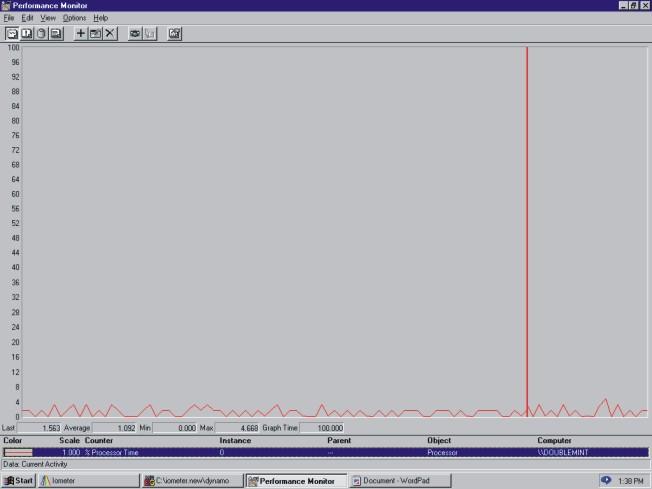 |
Figure 1 (left): Processor Performance when Writing to Hard Disk Drive The first screen shot, Figure 1, shows the Processor: % Processor Time for a Windows NT system running Intel's IOMeter performing 100% random writes to a hard disk drive. In this exhibit you can see that the processor utilization averages around 1.8%. However, if you were to try and run additional applications on this system, the processor utilization would only marginally increase because the processor is tied up waiting on I/O from the hard disk drive. In this example, IOMeter shows that on average there were 150 writes per second (150 IOPS) to the disk drive. | |||||||||||||||||
 |
Figure 2: (left) Processor Performance when Writing to a Texas Memory Systems RamSan-210 Figure 2 shows the exact same system, exact
same access specifications in IOMeter running against a Texas Memory Systems
RamSan-210. | |||||||||||||||||
|
UNIX For UNIX operating systems, the following commands are useful: top, iostat, and sar. Depending on the command you will receive slightly different output. The "Top" command, when executed on a Solaris system, produces results that have the following format: load averages: 0.09, 0.04, 0.03
66 processes: 65 sleeping, 1 on cpu CPU states: 69.2% idle, 18.9% user, 11.9% kernel, 0.0% iowait, 0.0% swap Memory: 128M real, 4976K free, 53M swap in use, 542M swap free The key is that this command provides the "% iowait" for the system. It is important to note, that "Top" provides a snapshot of performance. It is helpful to look at I/O wait results over peak processing periods to better understand the average I/O wait time. It is also reasonable to look at the "vmstat" command. This command will tell you how frequently your system is paging to virtual memory (disk). If you have frequent paging, it makes sense to consider adding RAM to your system or using a RamSan-210 as the disk for paging. Paging to disk is another way that hard disk drives can introduce bottlenecks into system performance. Texas Memory Systems Oracle Benchmarks Texas Memory Systems completed a series of test involving Oracle 8i running on a Sun 220R server with two 450Mhz processors running Solaris. A set of tests compared a Departmental RAID versus our RAM-SAN solid state disk. The testing was done using Oracle 8i. The test results were staggering. The following average results were observed from "Top": Departmental RAID: CPU states: 1.0% idle, 24.0% user, 15.0% kernel, 60.0% iowait, 0.0% swap RAM-SAN CPU states: 0.0% idle, 80.0% user, 20.0% kernel, 0.0% iowait, 0.0% swap These results demonstrate the impact of a RAM-SAN solid state disk running Oracle tests. The "iowait" statistics show right away the amount of time that is wasted while the CPU waits for data to return from the RAID system, while the RAM-SAN did not cause any "iowait". The net result is that the "user" application, in this case Oracle, is able to more effectively utilize the processor. With the RAID system the processor only spends 24% of its time working on the application. With the RAM-SAN the processor spends 80% of its time working on the Oracle application. These differences translated directly into impacts on the execution time for the Oracle queries and operations. As the number of concurrent users increased and as the complexity of the queries increased the RAM-SAN pulled further and further away from the performance of the Departmental RAID. On simple sequential tests, the two systems performed very similarly with the cache on the RAID providing some extra performance. As the tests increased in randomness and complexity the RAM-SAN completed processing as much as 15 times faster than the Departmental RAID. The higher your I/O wait time, the more a RAM-SAN will be able to improve your throughput. Once you have determined that you have I/O wait time, the next step is to determine whether the entire database or just a subset of files should be moved to a solid state disk. Oracle Components that should be Moved to Solid State Disk Once you determine that your system is experiencing I/O subsystem problems the next step is to determine which components of your Oracle database are experiencing the highest I/O and in turn causing I/O wait time. The following database components should be looked at: Entire Database. There are some databases that should have all of their files moved to the RamSan-210. These databases tend to have at least one of the following characteristics:
Redo Logs. Redo logs are one of the most important factors in the write performance for Oracle databases. Whenever a database write occurs, Oracle creates a redo entry. Each redo entry is written to two redo logs. Oracle strongly encourages the use of two redo logs so that a backup redo log is available in the event of a failure. The operation is considered committed once the write to the redo logs is complete. The redo logs are a source of constant I/O during database operation. It is important that the redo logs are stored on the fastest possible disk. Writing a redo log to a solid state disk, such as the RamSan-210 is a natural way to improve overall database performance. Because the RamSan-210 writes once to memory and twice to internal disk drives, the redo logs are protected from volatility issues. Indices. An index is a data structure that speeds up access to database records. An index is usually created for each table in a database. These indices are updated whenever records are added and when the identifying data for a record is modified. When a read occurs an index is consulted so that Oracle can quickly get to the correct record. Furthermore, many concurrent users may read any index simultaneously. The activity to the disk drive is characterized by frequent, small, and random transactions. Under these conditions, disk drives are unable to keep up with demand and I/O wait time results. By storing indices on a RamSan-210 solid state disk, performance of the entire application can be increased. For on-line transaction processing (OLTP) systems with a high number of concurrent users this can result in faster database access. Because indices can be recreated from the existing data, they have historically been a common Oracle component to be moved to solid state disk. Temporary Tablespace. Temporary segments are used to support temporary data during certain Oracle operations. The tables support complex queries, joins and index creations. Because temporary segments support many kinds of operations they can quickly become fragmented. In internal tests at Texas Memory Systems, we have found that Oracle database performance degrades quickly as data becomes fragmented. When complex operations occur they will complete more quickly if the temporary tablespace is moved to solid state disk. Because the I/O to the temporary tablespaces can be frequent, disk drives cannot easily handle them. Rollback Data. In databases with a high number of concurrent users, the rollback segments can be a cause of contention. Rollback data is created any time an Oracle transaction updates a record. In other words, if a delete command is issued, all of the original data is stored in the rollback segment until the operation commits. If the transaction is rolled-back, then the data is moved from the rollback segment back to the table(s) it was removed from. Because the rollback segments are hit with every update operation, and because the number of rollback segments is limited, it is useful to have the rollback segments stored on solid state disk. This will provide fast writes when the update transaction is created and will make rollback segments available more quickly for the next update operation. Frequently Accessed Tables. It is estimated that only 5%-10% of data stored in OLTP systems are frequently accessed. These tables typically account for a large percentage of all database activity and thus I/O to storage. When a large number of users hit a table, they are likely going after different records and different attributes. As a result, the activity on that table is random. Disk drives are notoriously bad at servicing random requests for data. In fact, the peak performance of a disk drive drops as much as 95% when servicing random transactions. When a table experiences frequent access, transaction queues develop where other transactions are literally waiting on the disk to service the next request. These queues are another sign that the system is experiencing I/O wait time. It makes sense to move the frequently accessed tables to a RamSan-210. RamSan-210 performance is not impacted if performance is random. Additionally, solid state disks by definition have faster access times than disk drives. Therefore, application performance can be improved up to 10x if frequently accessed tables are moved to the RamSan-210. Because the RamSan-210 mirrors all memory writes to two internal hard disk drives, your frequently accessed data is protected. Identifying the Most Frequently Accessed Tables The Oracle database constantly acquires data on the files that are accessed. This data is stored in the V$FILESTAT table. This table starts gathering information as soon as a database instance is started. When a database instance is stopped, the data in the V$FILESTAT table is cleared. Therefore, if the database instance is routinely stopped, it is important to capture the data from the V$FILESTAT table before the data is cleared. It is possible to create a program to gather this data and move it to a permanent table. Additionally, Oracle's Statspack tool will gather this information and store it in permanent tables. The following fields are available from V$FILESTAT:
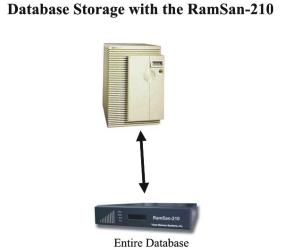
A simple query and report from the V$FILESTAT table will indicate which Oracle database files are frequently accessed. Adding PHYRDS and PHYWRTS gives the total I/O for a single file. By sorting the files by total I/O it is possible to quickly identify the files that are most frequently accessed. The most frequently accessed files are good candidates for moving to a RamSan-210. By sampling the V$FILESTAT table at set intervals, it is possible to estimate the average number of I/O's per second. (Change in PHYRDS + Change in PHYWRTS)/Elapsed Time in seconds = Average I/O per second Once frequently accessed files are moved to the RamSan-210 it is good to periodically evaluate the performance of the files that remain on RAID or hard disk based storage to see if new candidates have emerged and need to be migrated to solid state disk. Integrating the RamSan-210 into your Storage Network The RamSan-210 is designed to accommodate the needs of diverse storage environments. Our Fibre Channel interfaces can be configured to support point-to-point operation, arbitrated loop and switched fabric. Therefore, the RamSan-210 can be connected directly or to Fibre Channel switches or Fibre Channel hubs. Entire Database Configuration As discussed earlier, it is practical to store an entire database to a RamSan-210. The RamSan-210 is capable of storing up to 32GB of database components. Using host software, additional RamSan-210's can be arrayed for individual databases that exceed 32GB in capacity. |
||||||||||||||||||
| ||||||||||||||||||
|
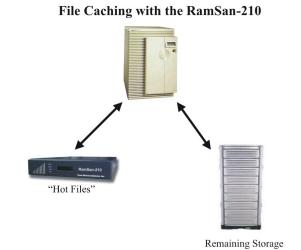
As indicated in the diagram (Figure 3), the RamSan-210 can be attached directly to host servers through Fibre Channel interfaces. Because the RamSan-210 includes four Fibre Channel interface ports, it is possible to connect it to up to four separate servers without using a Fibre Channel switch. Alternatively, the additional interface ports can be used for fail-over. The RamSan-210 also supports operation in clustered environments. It is also possible to connect the RamSan-210 to a storage network switch and then to a server. Many companies are migrating to storage area network (SAN) environments. It is possible to attach the RamSan-210 directly to a switch. With this configuration, multiple servers can talk to the RamSan-210 through a single switch or redundant switches. Fibre Channel switches rarely introduce performance bottlenecks and are good ways to share resources among host servers. File Caching Configuration The "classic" SSD application is as a file cache for large databases. File caching involves the relocation of "hot files" from disk-based storage to an SSD cache (see Figure 4). This accomplishes two primary objectives. First, the hot files reside on the fastest possible storage medium—SSD. Secondly, the hot files are no longer on disk storage, freeing RAID devices to serve remaining files more efficiently. Fewer RAID accesses also result in less mechanical stress and improved life expectancy for RAIDs. File caching is an excellent application for a SSD since the cost of SSD storage makes it impractical for storing terabytes of data. This small SSD is able to complement existing RAID storage by only storing the frequently accessed sections of large databases within the SSD itself. File caching is a good compromise between RAID and SSD storage that provides an excellent solution for accessing large databases quickly. Moving only frequently accessed data to an SSD, however, permits the use of smaller and less expensive SSDs, resulting in a critical performance boost at a lower overall cost. If performance is your goal, then the RamSan-210 is the means of achieving it. It is the only product capable of delivering I/O performance at a lower cost than a RAID. |
. | |||||||||||||||||
| ||||||||||||||||||
|
It is possible to attach the RamSan-210 and a RAID directly to the host using either multiple Fibre Channel host bus adapters or using a Fibre Channel host bus adapter for the RamSan-210 and a SCSI interface for the RAID. File caching is easily implemented in companies that have already implement a SAN. The RamSan-210 can be attached to the Fibre Channel switch and available for database performance acceleration within an hour of starting installation. |
||||||||||||||||||