sugaring
flash
for the enterprise adding e to M/T/Q/LC
how the enterprise adoption of flash changed from 2004 to 2018
and
how it will change again
by
Zsolt Kerekes,
editor, StorageSearch.com |
| .. |
| Unlike
the
Cola
Wars - you can't afford
the risk of a bad
enterprise MLC SSD taste test. | |
MLC and other flash in enterprise SSDs -
past, present and future
If you're unclear about the
differences between MLC and SLC (or the nuanced differences between SLC, eMLC,
pSLC, MLC, TLC, QLC, XLC? and other aliases for nand flash) - see
SSD jargon or
flash memory and nvm news
or site search of your choice.
The use of flash SSDs in
enterprise server acceleration has been hotly and seriously debated here in
the pages of StorageSearch.com since about 2004. The notes below summarize
what those past technical issues were and how things look today.
In
2004 the typical
endurance of
the flash memory used inside a 2.5" SLC flash SSD was 100K write cycles.
Today the typical flash memory inside a 2.5" MLC SSD is rated at 3,000
cycles (30x worse). And yet in the same period (2004 to 2013) the
sustained R/W speeds of the
fastest 2.5" SSDs
have gotten 45x faster (from 40MB/s
2.5" PATA to
1,800MB/s 2,5"
PCIe) putting 1,350x more pressure on
managing already
strained endurance (assuming the same number of flash chips in the SSD).
The detail of the debates surrounding enterprise flash SSD has
changed over the years. But all the arguments revolve around the question of -
is this SSD going to be reliable
enough in my application?
Back in 2003 all enterprise
acceleration SSDs were RAM
SSDs.
In
2004 -
a customer
case study by BitMicro - showed that a single 3.5" flash SSD could
provide useful speedup in a 25,000 user server - compared to hard disk based
RAID. But flash SSD makers
weren't active in the enterprise market in those days. They sold to oems and
systems designers. It wasn't economic for flash SSD oems to
educate end users
about SSDs, understand the complexities of user applications and configure the
hot spots in a user server - simply to sell a single SSD.
In 2006 -
SSD makers started shipping small form factor flash SSDs in volume aimed at the
notebook
market.
In 2007 - many
SSD makers started shipping rackmount products and small form factor SSDs
specifically into the server acceleration market. Those early SSDs were SLC -
which typically had endurance of 100,000 write cycles per block. By selecting
memory chips and processes - some SSD makers claimed their SLC SSDs could last
10x longer.
In 2008 - there
was a tempation for systems integrators to deploy low cost consumer MLC flash
SSDs in enterprise applications. But MLC endurance was 10x worse than
SLC - and consumer SSD controllers couldn't manage MLC reliably in high IOPS
environments. Some customers found out the hard way when their flash arrays
burned out. The conventional wisdom at the time was - don't use consumer MLC
SSDs in caching / accelerator environments.
In 2009 - a new
wave of SSD companies including
Fusion-io and
SandForce made waves
in the market with fast high IOPS enterprise SSDs which used consumer grade
MLC flash inside. They said - what made the difference - was the intelligent
management of flash risks inside their architectures.
In 2010 -
some leading flash memory chipmakers started marketing so called "enterprise
grade" MLC flash. This was a formal productizing of high endurance
MLC - achieved by factory processes - to achieve similar ends which some SSD
makers had been doing since 2004 with SLC - that is to say is selecting the
best of breed flash to cream off batches with 10x better than average
endurance.
In 2011 - you
can find at least 3 different types of flash memory (SLC, consumer grade MLC
and enterprise grade MLC) inside fast enterprise SSDs such as
PCIe SSDs. And the
situation could get even more confusing in future with x3 MLC and other nv
memory types possibly appearing in enterprise 2.5" SSDs in the next year or
so too.
The argument is shifting from which type of flash memory is
best? - to whose SSD controller and flash management scheme do you believe is
best?
That makes it harder to evaluate competing products and make
decisons which are safe without
paying more than
you need to.
In 2014
- 3D MLC indisputably joined the roster of flash types deemed good enough to
ship in enterprise SSDs.
In August 2015 -
Justifying why 3D TLC is good enough for enterprise AFA's Kaminario said - "97%
of (our) customers are writing less than a single write per day (under 1
DWPD) of the entire
capacity."
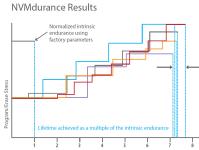 In
April 2016
- An endurance stretching company called NVMdurance inspired
the editor of StorageSearch.com
to scribble some
limericks about
flash endurance. In
April 2016
- An endurance stretching company called NVMdurance inspired
the editor of StorageSearch.com
to scribble some
limericks about
flash endurance.
In 2017 - flash memory makers couldn't
manufacture enough chips to keep up with demand due to difficulties making
next generation 3D. The number of flash chips supplied stayed nearly flat -
year on year. This led to increased
prices and
invalidated many long term expectations, assumptions and business plans.
(Read the
consequences
here.) One effect of the price hikes in nand flash was to make alternative "emerging"
nvms seem more competitively attractive after more than 16 years of chasing
flash's past footsteps. For more about this see my article -
adding new notes to the music of memory tiering.
For more about the arguments re flash see these articles:-
| |
| . |
 |
| . |
how safe are your
assumptions about SLC?
"we broke that new SLC in 3 months" |
Editor:- March 18, 2014 -
SLC
is regarded as the "gold standard" in
nand flash memory today
when it comes to
SSD endurance.
Or maybe it would be more accurate to say - "SLC is the depleted
uranium standard" when it comes to choosing ingredients for hardening the
SSD data integrity
sandwich.
So you can imagine my surprise- when in a recent
conversation about the reliability aspects of SSDs - I was told about some
unique and proprietary "brutal and awkward test patterns" - which
had uncovered design flaws in a new type of SLC memory while it was being
characterized for use in SSDs.
This indicated that SSDs designed
using that new SLC memory in some applications could be killed in as little as
3 to 9 months of use.
This design vulnerability never showed up at
all in the "standard"
SSD controller test
patterns which are used throughout the industry.
And their
application wasn't for an SSD accelerator - but for a regular speed SSD.
From
the customer point of view - if you want an embedded SSD which you can rely on
- it's nice to know that some people still design SSDs the old fashioned way -
and test every assumption along the way.
That was just one of many new
things I learned talking to Dave Merry
and John
Conklin co-founders of a new SSD company called FMJ Storage - which has -
for the past several years been operating profitably while under the general
market radar.
You can see more about what we talked about in -
Who's who in SSD? - FMJ
| | |
| . |
| There's a lot more to
marketing enterprise SSDs than adding an "e" to a consumer technology
SSD brand (and redesignating it an "enterprise" product) - said
Fusion-io's CEO in an
interview
July 2010. | | |
| . |
|
|
|
SLC
versus
MLC
in Enterprise SSD arrays
looking at the risks posed by a new
generation of MLC Nand Flash SSDs.
classic article - by Zsolt Kerekes, editor, June
2008 |
The original purpose of my
SSD Myths
article was to show that you needn't worry about wear-out if you use "best
of breed" flash
SSDs with write-endurance on the order of 1 million cycles and above.
When
it was first published (in
March 2007)
all flash SSDs in traditional
hard disk form factors
used SLC.
But in the year following publication many
leading SSD oems
(including Samsung,
Mtron and
STEC ) have also
introduced MLC products too.
To confuse things even more - in June
2008 - Silicon Motion
announced a new family of flash
SSD controllers which
enable oems to mix and match MLC and SLC chips in the same drive - creating in
effect SLC-MLC
hybrid SSDs.
MLC doubles the capacity of flash memory by interpreting 4 digital
states in the signal stored in a single cell - instead of the traditional
(binary) 2 digital states.
This technique has been commercialized and
proven over many years in hundreds of millions of cell phones and MP3 / iPod
music players - where the theoretical consequence of data corruption (if
anything went wrong with this risky "new" storage technology) was no
more serious than an inaudible sub millisecond sound blip or invisible pixel
splat.
In the
SSD market MLC yields much
lower cost storage than SLC with read / write speeds which are nearly as fast
as the best SLC devices.
The manufacturers of first generation "hard
disk replacement" MLC flash SSDs have responsibly classified them as aimed
at the "notebook
market" and by subtle wording differentiated them from their more
pricey "enterprise" products. In the low duty cycle world of a
notebook these MLC SSDs should give a good operating life - typically similar to
the hard disks they replace. (Most SSD marketers would claim their MTBFs are
even better than HDDs).
But there's no way to tell the difference
between SLC and MLC SSDs externally (apart from the model numbers). Put them in
a rackmount system in a datacenter with fast processors which can pump them
continuously close to the maximum speed and what happens? |
It's a simple matter to plug new data for MLCs
into the calculation I did for the worst case wear-out process for flash SSDs -
which I called the Rogue Data Recorder.
Instead of the 64GB example
I used then, I'll assume the MLC SSD has 128GB capacity. MLC SSDs have
more capacity than SLC. And more capacity means longer operating life - before
cells wear out.
I'll still use the 80M bytes / sec sustained write
speed - because the fastest MLC products (in Feb 2008) can already do that.
(Meanwhile the fastest SLC products have moved up in the world and are about 50%
faster.)
The next factor is where we hit the big problem... Instead of
a write endurance rating of 2 million cycles (for the best SLC) - I can only use
a figure of 10,000 for MLC. MLC has a much lower rating due to the complex
interaction of discriminating multiple logic levels reliably coupled with the
intrinsic failure mechanism of wear-out.
Plugging these numbers in the
same calculation gives an estimated MLC flash SSD operating life (at max write
throughput) which is 6 months! (instead of 51 years for a 64GB SLC
SSD).
That's not good enough for a data driven enterprise. There
isn't a wide enough safety margin.
Proponents of MLC might say - can't
you batch select MLC chips for better write endurance in the same way that some
oems do for SLC wear out? - Couldn't that give a figure that is 10x better?
There's not enough data to give a definitive answer - but I suspect
the answer would be no!
The reason is that you would be selecting for
the mutual inclusion of a single chip being inside 2 different probability
curves for what are already secondary characteristics. (Like looking for the
ideal man in
Sex and the
City.) Even in the unlikely event that you could find some devices with the
magic properties to do this - the yield would be small - pushing the cost up
and eliminating the main reason for using MLC.
That's where I thought
this "SLC versus MLC in enterprise SSDs" discussion would end. But
then another factor appeared out of the blue.
Sam Anderson at
EasyCo pointed out to me
that one side effect of their patent pending Managed
Flash Technology is that their software "effectively erases erase
blocks 10 to 100 times less frequently than drives doing traditional
random writes" because it writes address blocks monotonically.
EasyCo's
MFT was originally designed to give much faster system IOPS in flash SSD
arrays by using patent pending write algorithms which manage arrays of standard
SSDs in a way which reduces the probability of successive writes to an address
block which is already busy in a time consuming erase/write cycle.
This
new (to me) attribute of MFT opens up the possibility of yet another generation
of high speed rackmount SSDs with new price points which could be 50x lower
than
RAM SSDs while being
only 3x slower overall in typical applications.
Some of the papers
listed in the footnotes below cover topics such as Data Retention (which in
gets worse for blocks which have been more frequently erased), and Disturbances
(caused by adjacent R/W operations) - all of which are much more significant
issues for MLC compared to SLC. |
|
Conclusion?
I can't give
a definitive answer to the question - Are MLC SSDs Ever Safe in Enterprise
Apps?
With the current state of technology in 2008 - it depends on the
application and the consequences of data corruption.
I wouldn't risk it
if I were a bank - but I might not mind if my own bank risked it and changed
some pluses to minuses...
Seriously though I hope this article has
shown that there are serious risks inherent in using MLC flash SSDs if they
are not applied correctly.
Some of these risks can be managed by
choosing an SSD array supplier who has qualified and tested their racks with
products from a single known source (because every make of MLC flash SSD has
its own unique failure profile).
I know that despite my warnings - MLC
flash SSDs will get used in some enterprise apps - because the cost
difference (compared to other options) is very attractive.
In my view
using an MLC flash SSD array for an enterprise application without at least
using the (claimed) wear-out mitigating effects of a technology like Easyco's
MFT is like jumping out of a plane without a parachute.
And even
with a parachute - strange things may still happen to wannabe MLC SSD enterprise
pioneers on the way down.
PS - these warnings were valid for
coonsumer MLC flash and the state of controllers and SSDs which were shipping in
2008. Newer developments since then - described in the articles at the top of
this page have changed this guidance. However, there are still some vendors
shipping enterprise SSDs today which can - in the wrong apps - die from
premature wear-out in a few months.
More Articles About Flash SSD Data Integrity
Can you trust your flash
SSD specs?
Increasing
Flash Solid State Disk Reliability
SSD Myths and
Legends - "write endurance"
Data Integrity
Challenges in flash SSD Design
Is All
CompactFlash Really Created Equal? (pdf)
Flash Disk Reliability
Begins at the IC Level (pdf)
SLC
vs. MLC: An Analysis of Flash Memory (pdf)
The
Inconvenient Truths of NAND Flash Memory (pdf)
Flash Solid
State Disk Write Endurance in Database Environments
Unveiling XLC Flash SSD
Technology - spoof article on x4 MLC |
| . |
|
|
| . |
|
|
| . |
|
|
| . |
| Yes you can! - swiftly
sort the Enterprise SSD buckets |
If you're trying to
create your first short list of vendors to talk to about how to speed up your
enterprise apps using SSDs - you realize now - with a sinking feeling in your
gut - that maybe delaying the decision for the past several years wasn't such a
good idea after all.
Because the range of technologies and design
approaches is now so bewildering that you envy your peers in other (richer)
companies who started down the SSD track when the range of solutions was so
much simpler.
Your problem today isn't just that vendors don't seem
to agree about where the best place is to put the SSD or what memory should be
inside it (something I've written about in the
SSD heresies).
The
problem is that even when you try to narrow down SSDs to a single interface -
the competing SSD vendors tell a very different story about what their
products will do for you and how much they will
cost. And this
confusing picture isn't simply down to
SSD jargon - which
is bad enough - but you're getting the hang of it. There's something tangibly
different lurking behind those shadowy SSD vendor promises - but you can't
quite put your finger on what it is.
Is there a simple methodology
which - starting from the very first press release you see on the web -
reliably helps you classify all enterprise SSD products - to create
2 distinct groups.
- the SSDs you're not interested in
- the SSDs that might be worth a closer look
without the risk that
you may miss out the best choice for your situation - and without having to read
hundreds of articles and reviews? |
|
| | |
| . |
|
|
|

| |
..... |
 |
| .. |
First you learned about SLC (good flash).
Then you learned about MLC (naughty flash).nice vs naughty
flash (management summary)
The arguments about flash in enterprise SSD accelerators
have changed since this trend started in
2004.
First you learned about SLC (good flash).
Then you learned
about MLC (naughty flash when it played in the enterprise - but good enough for
the short attention span of consumers).
Then naughty MLC SSDs learned
how to be good. (When strictly managed.)
But thanks to genetic
alteration some naughty MLC has been bred to be much nicer than others.
(Even when the strict controller isn't looking.) This (extra-good) MLC is
always preceded by an "e" to show it's better. (Like email. OK email
vs the pony express -
Postman - kind of mail
which is derogatively called snailmail.)
But other people say you
don't need the expensive "e" in eMLC - because their controllers
empathize better with native naughty flash. (They don't approve of flash
eugenics and they really do care about street bred naughty flash cells being
sent to bad block jail too soon.)
And a new type of naughty flash
which wants to be in with the gang on the enterprise SSD block is TLC (alias
x3).
Is your head ready to explode yet?
It's going to get
even more complicated.
Best forget the technical explanations, click
on the ads with the nicest pictures and think of it all as SSD magic.
Why
do you need to allow space for that uncouth MLC flash in your nice clean
reliable datacenter?
It's much cheaper - even when you take into
account the effort of cleaning it up and re-training it than the other kinds
of memory. Even so you still need SLC (good) and RAM (positively angelic) for
ultimate performance.
Mind you - RAM's halo has started to get out of
focus recently. (It wasn't the security risks from those
disturbance
errors.) The problem is those DIMM sockets look too rich and cozy and have
attracted some high speed
memory cuckoos
cricling round the nest. Or are they really vultures?
You would've
thought that
RAM was RAM
and that was that. But now we're starting to see naughty types of RAM too. Some
of these were never intended to be RAM when they left the chip factory.
That
leads to the question - what is RAM?
The short answer is that RAM is
whatever the software thinks is RAM and if it plugs into a RAM socket and
keeps the applications happy so much the better. (But the pretend RAM doesn't
even have to do that.)
A twist in the tail is that vendors are
brainwashing flash to think it's RAM. (It was bad enough when they replaced RAM
in SSDs. Now they talk about Storage Class Memory.
Of course - there
isn't just one single type of memory which is best for SCM. You guessed it!
There are already about 4 different
types.
Some
have the word "RAM" in to make it easier to recognize them. But others
don't. Some of these new pretend RAMs have never been seen outside a fund
raising press pack or have never been any closer to a an enterprise user
than a glass cased box in a booth at a trade show.
These new server
RAM multiple personality problems just reinforce the feeling that nothing is
sacred any more in the world of virtual devices.
The only solid
physical reminder is the cost - when you get to pay for it all. And the
enterprise marketers are doing their best to
virtualize
that too. | |
. |
Retiring and retiering
enterprise DRAM was one of the big SSD ideas which took hold in the market in
2015.
Over 20 companies have already announced products for this
market among which are Memory1, 3DXPoint etc
But what are the
underlying reasons that will make it feasible for slower cheaper memory to
replace most of the future DRAM market without applications noticing? |
| latency loving
reasons for fading out DRAM | | |
. |
| "...The debate
about using MLC flash in enterprise SSDs - aka "eMLC" - has moved
on to a new level. The argument is no longer - can MLC can be made to work
reliably? Or how
many lifetime
writes are good enough? It's - who's way of doing - so called -
enterprise flash (of any kind) tastes best?" |
| SSD endurance myths
and legends | | |
| . |
|
|
Surviving SSD
sudden power loss
what do
enterprise SSD users want?
how fast can your SSD
run backwards?
Data Integrity
Challenges in flash SSD Design
MLC flash lives longer in my
SSD care program
7
SSD types will satisfy all future enterprise needs |
| . |
 |
| . |
| Unlike traditional SSD
designs - in adaptive R/W the ECC/ DSP strength, duration of the write
program pulse and even the virtual block size can all be varied to optimize
the SSD's headline objectives (such as speed or power or usable to raw
capacity) and reconcile them with the flash memory's actual health
condition. |
| Adaptive flash
care management & DSP IP in SSDs | | |
| . |
StorageSearch talks to
SSD leaders...
re flash in enterprise SSDs | |
Fusion-io's
CEO - re MLC in banks.
Over 80% of the SSDs that
Fusion-io has sold in the last couple of years have been MLC rather than SLC -
and David Flynn
thinks that they probably have a bigger base of enterprise MLC SSDs which has
been operating longer in customer sites (upto 3 years) than any other company.
...read
the article |
 |
|
Texas Memory Systems
- re MLC and RAM SSDs.
Jamon Bowen
said current consumer grade MLC nand flash has endurance on the order of 3,000
write cycles. ... And the company's burn-in process (done for QA as part of
manufacturing) would use up 10% of the endurance life before the SSD even
reached the customer!
In many bank applications RAM SSDs are actually
cheaper than flash - because of the small size of the data. ...read the article | | |
| . |
| what about
enterprise MLC flash? |
In July 2010 - a reader (Rob Mantia)
asked - I was wondering what your opinion is on the decision of some SSD
manufacturers to switch to
enterprise
MLC flash from SLC flash for their enterprise SSDs and if you think eMLC is
as great as they make it sound (less cost, just as reliable) or if you think
it's overhyped.
Here's what I said.
The view expressed in the original text
of my 2008 article
Are MLC SSDs Ever
Safe in Enterprise Apps? hasn't changed.
Civilian enterprise
users of flash SSDs have to segment their applications for flash into 2 types -
SLC or MLC (and that "MLC" includes eMLC) depending on the mission
criticality and costs associated with the risk of data corruption.
eMLC mitigates just 1 problem (endurance) of the 4 major risk factors associated
with MLC which are significantly worse for MLC than SLC.
The other 3
intrinsic risk factors are
-
noise immunity - due to much smaller signal change associated with each
logical bit
- data integrity - due to physical variations across the chips (MLC
poses more problems for R/W-ability even from the outset in a new chip)
- temperature sensitivity - if you subject MLC to extreme temperature
fluctuations you may irrecoverably lose data which the ECC cannot bring back.
That's why MLC SSDs aren't used in
military or industrial
products.)
So as per my original article...
MLC is OK for server apps like video streaming (no big deal if
a few pixels change color).
MLC is risky for storing financial data - like derivatives
models and trades.
| |
| . |
| doesn't write amplitude
control make MLC safe? |
In June 2010 - a reader asked if the
comments in the article - Are MLC SSDs Ever Safe in Enterprise Apps? - were
still valid - given that a few years had elapsed since it was written.
Don't
SSD controllers
from
Anobit,
SandForce and
WD Solid State
Storage - which reduce
write amplitude -
fix the problem of low MLC endurance?
Here's what I said.
Yes
- but that's only one of the problems with MLC which was identified in
this article. And this has to be reevaluated with each new flash memory
generation - because the difference in intrinsic
data integrity
between SLC and MLC gets worse with smaller geometries.
What has got better is the strength of the error correction schemes
which hide the magnitude of raw media defects in MLC.
A lot depends on your environment - because temperature cycling lead to charge leakage - and
there isn't much tolerance in MLC cells. That's another reason that all
industrial temperature SSDs are SLC. (No ECC scheme can fix a device which
has redistributed too much charge.)
The issue of EMC compatibility
(discussed in the original article) remains in my mind an intrinsic difference
which no one else in the industry seems to be worrying about. If you don't have
a noisy power rail or ground rail in your app then the EMC may not be
determining factor.
If you have time - a good test would be to do continuous overwriting
of your SSD with randomly changing data - and each time you fill the disk read
back the whole disk and compute a data checksum. Run this for several weeks or
months to qualify a new SSD (or HDD) for a mission critical app.
More
about EMC compatibility etc in the original article text below... | |
| . |
| Are MLC
SSDs More Susceptible to Power Rail Disturbance? |
As someone who in a past career designed
analog data acquisition products and systems which got right down below the
thermal noise and who cared about the shape and material of PCB tracks I want
to air another concern about the (in)/advisability of using MLC Nand flash
in datacenter applications where there's a lot of power rail disturbance.
Although
MLC devices have been used in commercial products since 2003 - the products they
have been in (phones and portable music players) have been battery operated
environments where (inside the casing) the environment's overall power rail and
electromagnetic
compatibility has been controlled and managed by the system designers who
know enough about these things. And as I say elsewhere in this article - the
consequences of misread data in these applications are trivial.
You
could say almost the same about the environment for a MLC flash SSD inside a
notebook PC. It's a known, testable environment. Although the user can plug
modules in - they're rarely a high energy disturbance product. The designers
would have tested it with a range of plug-ins, and they've sold millions of
similar notebooks before. There will be few surprises.
An array of
SSDs in a datacenter cabinet is not such a quiet place.
There are
plenty of fast processors all around. Above you - below you. The SSD designer
does not control that space. Every installation is unique.
Something
which you may not be aware of - is that inside an MLC flash chip are
effectively:- a 2 bit anlog to digital converter (ADC) and a 2 bit DAC. Between
each of the 4 logic levels there is also an indeterminate band where the signal
should never be. Power line disturbances are 3x more likely to result in a false
read for MLC than SLC, but the overall error comparison gets worse. There's
also a bigger intrinsic risk (for MLC than in SLC) of an error creeping in with
the initial write charge. SSD designers deal with this by surrounding blocks
of MLC flash data with heavier error detection and correction codes than they
would normally use for SLC.
I found a good detailed discussion of ECC
potential problems in this Denali
article:-
Memory ECC: A curiosity for
decades, now essential for MLC NAND flash from which the quote below comes.
"With
the voltage levels closer together for MLC flash the devices are again more
susceptible to disturbs and transient occurrences, causing the generation of
errors which then have to be detected and corrected. If that is not enough for
the chip maker, it poses an even larger problem for the system designer, in that
there is more of a variety of technologies employed among competing flash chip
designs than DRAM makers, for example, would ever dream of."
For a
related discussion about what EMC (not the storage company) can mean for
signal integrity going into a flash SSD see the white paper -
Noise
Damping Techniques for PATA SSDs in Military-Embedded Systems (pdf) by
SiliconSystems. | |
| . |
| More Conclusions |
Flash SSDs are complex systems with a lot
of stuff going on inside.
Like cars (which use the internal combustion
engine) all flash SSDs from all manufacturers are not the same.
Even
if they have the same capacity and interfaces.
There are many
different process and media management technologies inside a a flash SSD
which oems deal with (or not) in their own proprietary ways. These are just some
of the consequences:-
- best to worst wear leveling algorithms can vary product life by a factor of
3 to 1. (That's not too bad. Some so called "SSDs" - which are
actually dumb flash storage bolted to a disk interface - don't have wear
leveling and should not be used in servers at all.)
- best to worst SLC endurance can vary by 30 to 1.
- SLC to MLC endurance can vary from 10 to 1, upto 300 to 1
- intrinsic electrical noise susceptibility between SLC and MLC is hard to
quantify - but probably on the order of 10 to 1. Although hidden by wrap
around redundancy
and error detection and correction - the possibility of uncorrectable errors
is still greater in MLC - which is unproven in enterprise environments.
Buying flash SSDs for enterprise applications should be regarded as an important
qualifying process. Just as you wouldn't buy a traditional
RAID system without
knowing what type of hard disks were inside it, or without knowing something
about the experience of the vendor in enterprise apps - so too you shouldn't
buy flash SSDs without asking about the factors discussed in this article.
The
risk for users is that many oems who designed SSD architectures for the notebook
market - will try to capture business in the enterprise market - with the same
(or similar) products without dealing with the datacenter's need for better
resilience and data reliability.
And, sadly, I know from my own inbox
that some SSD marketers don't know how much they
don't know
about their own market and how much more advanced their competitors are in
the field of reliability. | |
| . |
| |